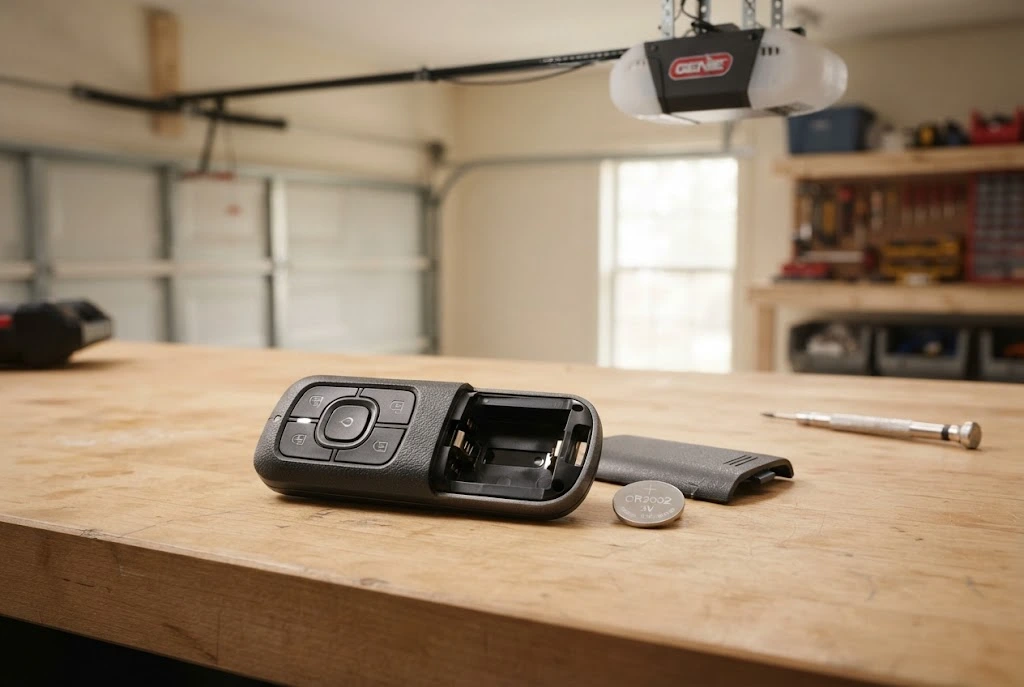
Knowing how to change battery in garage door remote can save you time when a normally reliable remote becomes weak, inconsistent, or completely unresponsive. In most cases, replacing the battery is a straightforward maintenance task that takes only a few minutes. However, garage door remotes use different battery types and housing designs, so it is important to identify the correct battery and install it in the proper orientation.
A remote that suddenly stops working does not always have a dead battery. Programming problems, damaged buttons, battery contacts, interference, or compatibility issues can also prevent communication with the garage door opener. For that reason, battery replacement should be treated as the first troubleshooting step rather than automatically assuming the remote itself needs replacement.
How to Change Battery in Garage Door Remote
The basic battery replacement process is similar across many garage door remote models. The exact method for opening the housing and accessing the battery will depend on the manufacturer and model.
1. Identify the Remote Model
Before opening the remote, look for a model number on the back, front, inside the battery compartment, or beneath a removable cover. This information can help you determine which battery the manufacturer specifies for the remote.
Do not assume that all garage door remotes use the same battery. Some use coin-cell batteries, while others use different battery formats. Checking the existing battery or manufacturer documentation is the safest way to identify the correct replacement.
2. Locate the Battery Compartment
Examine the remote for a removable battery cover, screw, seam, or small opening designed to separate the housing. Some remotes have a dedicated battery door, while others require the two halves of the housing to be carefully separated.
If the remote has a screw, remove it using an appropriately sized screwdriver. If it has a slot designed for opening the case, use the appropriate tool gently rather than forcing the housing apart.
3. Open the Remote Carefully
Separate the remote housing carefully and avoid damaging the plastic clips or internal components. Once open, identify the battery and observe how it is positioned.
Before removing it, pay attention to which side is facing upward. This makes it easier to install the replacement in the correct orientation.
4. Remove the Old Battery
Gently release the old battery from its holder. Avoid bending or damaging the metal contacts because they need to maintain firm contact with the replacement battery.
If the battery is difficult to remove, do not use excessive force. Check whether the holder has a small retaining clip or release point designed to hold the battery in position.
5. Install the Replacement Battery
Insert the new battery according to the polarity markings inside the remote. Most batteries have a clearly marked positive side, while the battery compartment normally indicates the required orientation.
Make sure the battery sits securely in its holder. A battery that is loose or incorrectly positioned can cause intermittent operation even when it is brand new.
6. Close the Remote Housing
Once the replacement battery is installed, carefully put the remote housing back together. Ensure that the cover is completely closed and that any screw has been replaced securely without overtightening it.
7. Test the Remote
Press the remote button while standing at a normal operating distance from the garage door. If the door responds normally, the battery replacement has likely resolved the problem.
If the remote does not work after the battery has been replaced, continue troubleshooting instead of immediately purchasing another battery.
How to Choose the Right Garage Door Remote Battery
Choosing the correct battery is an important part of learning how to change battery on garage door remote. The battery number should match the specification for the particular remote.
Common garage door remote batteries include small lithium coin-cell batteries, but the exact specification varies between manufacturers and models. Some remotes may use CR2032 batteries, while others can use a different size or configuration.
The easiest way to confirm the correct battery is to check the number printed on the old battery. You can also consult the remote’s manual or the manufacturer’s official product information.
For example, if you are working with a Chamberlain remote, the specific remote model should be checked before purchasing a battery. The site’s dedicated Chamberlain garage door remote battery guide provides additional information about Chamberlain remote battery replacement.
How to Replace Battery in Garage Door Remote Without Damaging It
Garage door remotes contain relatively small electronic components, so careful handling matters. You do not need specialized electrical equipment for a standard battery replacement, but you should avoid unnecessary force.
Keep the remote on a clean, dry surface while working. Do not use sharp objects aggressively against the circuit board, and avoid touching electronic components unnecessarily. If the housing does not open as expected, identify the remote model and check its specific instructions instead of forcing the case.
It is also a good idea to keep the replacement battery in its original packaging until you are ready to install it. This helps protect it from accidental contact with metal objects and other sources of damage.
Signs Your Garage Door Remote Battery Is Weak
A remote battery can become weak gradually rather than failing without warning. Recognizing the early signs can help you replace it before the remote stops working completely.
- The remote works only when you are close to the garage door.
- You need to press the button more than once.
- The remote works intermittently.
- The indicator light appears weaker than usual.
- The remote suddenly stops responding.
- The operating range becomes noticeably shorter.
These symptoms can point toward a weak battery, but they are not proof that the battery is the only problem. If a new battery does not restore normal operation, further troubleshooting may be required.
What to Do If a New Battery Does Not Work
Replacing the battery should restore a remote that stopped working because of insufficient battery power. However, other problems can produce similar symptoms.
Check Battery Polarity
Remove the battery and confirm that the positive and negative sides are facing the correct direction. An incorrectly installed battery will not power the remote correctly.
Inspect the Battery Contacts
Look inside the battery compartment for loose, dirty, bent, or damaged contacts. The battery needs reliable electrical contact with these points to operate the transmitter.
Check Remote Programming
A battery change normally does not require reprogramming a functioning remote. However, if the remote has another issue or has been replaced, it may need to be programmed to the opener.
If programming is required, follow the instructions in the garage door remote programming guide rather than repeatedly replacing batteries.
Check Compatibility
Garage door openers and remotes are not universally interchangeable. A replacement remote needs to be compatible with the opener’s system.
If you are purchasing another remote, review the garage door opener remote compatibility information before ordering one.
Inspect the Remote for Physical Damage
A remote that has been dropped, exposed to moisture, or physically damaged may stop working even with a new battery. Check the housing, buttons, and battery compartment for visible damage.
If the remote remains unreliable, a replacement may be more practical. The garage door remote replacement guide can help explain when replacing the entire remote makes sense.
How to Change a Battery in a Garage Door Remote With a Screw
Some remote controls use a small screw to secure the battery compartment or the entire housing. If your remote has this design, use a screwdriver that fits the screw properly.
Remove the screw carefully and place it somewhere secure so it is not lost. Open the compartment, identify the battery orientation, and replace the battery with the correct specification. Afterward, reinstall the cover and screw without applying excessive force.
Do not substitute an incorrectly sized screw or attempt to force a screw into the housing. The screw helps keep the remote closed and protects its internal components.
How to Change the Battery on Different Garage Door Remotes
The general replacement procedure is similar, but the exact design varies by brand. Some manufacturers use simple sliding covers, while others use a two-piece housing that needs to be opened.
For brand-specific remotes, following the manufacturer’s model-specific instructions is preferable to applying a generic procedure. This is particularly important when the remote uses an unusual battery configuration or a specialized housing.
The site’s existing resources also cover several specific remote systems, including LiftMaster garage door opener remotes, Chamberlain remote troubleshooting, and Genie garage door opener remotes.
How Often Should You Change a Garage Door Remote Battery?
There is no universal replacement interval for every garage door remote. Battery life depends on the battery type, remote usage, storage conditions, and the specific design of the transmitter.
Instead of replacing batteries on a fixed schedule, watch for signs of weakening performance. If the remote begins losing range or becomes inconsistent, checking the battery is a sensible first step.
Keeping a compatible replacement battery available can also be useful for a frequently used garage door remote, particularly when the remote is the primary way you operate the door.
Garage Door Remote Battery Replacement vs. Remote Replacement
A battery replacement and a complete remote replacement are two different solutions. If the remote is physically intact and its buttons and electronics are functioning, changing the battery may be all that is necessary.
On the other hand, replacing the entire remote may be appropriate if the housing is damaged, the buttons have failed, the electronics are defective, or the remote is no longer compatible with the opener.
Before buying a replacement remote, verify compatibility and consider whether the existing remote simply needs a new battery. This can prevent unnecessary expense.
Related Garage Door Remote Battery Guides
Once you understand how to change battery in garage door remote, you may also need information about battery types, replacement options, and remote troubleshooting. These related resources can help:
- garage door remote battery guide
- garage door remote battery replacement
- choosing a garage door remote battery
- garage door remote not working
- garage door remotes
- universal garage door remote
- universal garage door remote compatibility guide
- garage door opener remote compatibility
- garage door remote replacement
Final Thoughts
Learning how to change battery in garage door remote is a useful basic maintenance skill. The process normally involves identifying the correct battery, opening the remote carefully, removing the old battery, installing the replacement with the correct polarity, and testing the remote.
If the remote continues to malfunction after a fresh battery is installed, investigate compatibility, programming, battery contacts, physical damage, and the garage door opener itself. Replacing batteries repeatedly will not solve a problem caused by a faulty remote or opener.
For manufacturer-specific instructions, consult the official documentation for your particular remote model. For general garage door remote information, the garage door remotes guide provides a useful starting point.
Also, for broader manufacturer guidance, consult the official Chamberlain support resources when working with a compatible Chamberlain remote or opener.
