A Chamberlain garage door remote battery is a small component, but when it becomes weak or dies, your remote may stop opening or closing the garage door. In many cases, replacing the battery is a simple maintenance task that can restore normal remote operation without replacing the entire remote.
Chamberlain uses different remote designs across its product range, so the exact battery and opening method can vary by model. Many current Chamberlain remotes, including models such as the CH361 and CH363, use a CR2032 coin-cell battery. However, you should always check the model number, existing battery, or owner’s documentation before purchasing a replacement.
What Battery Does a Chamberlain Garage Door Remote Use?
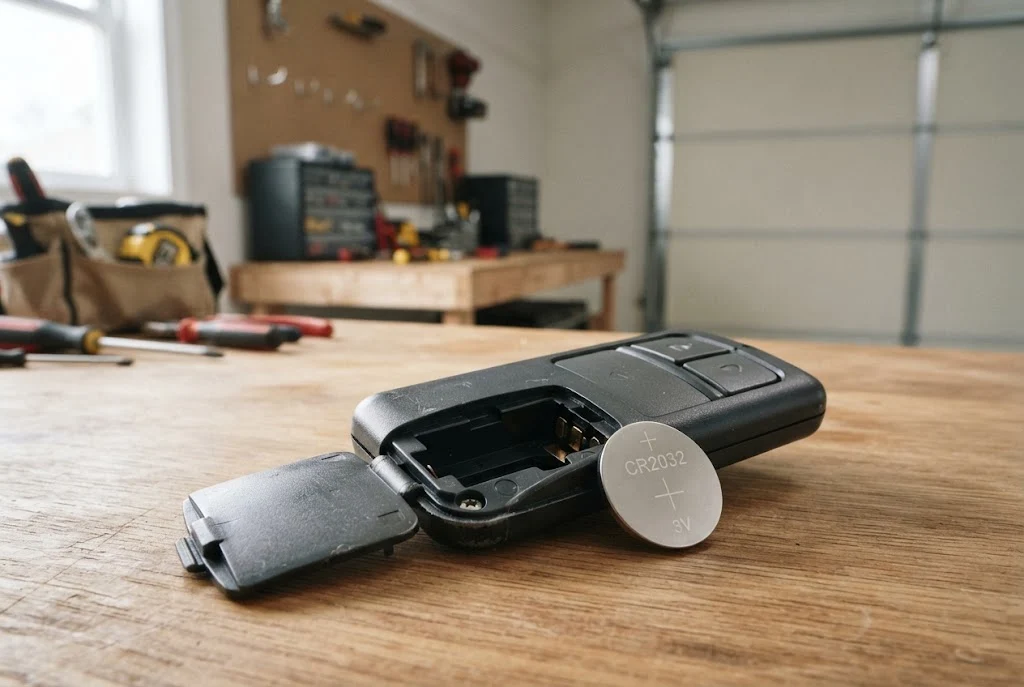
Many Chamberlain garage door remotes use a 3V CR2032 lithium coin-cell battery. For example, Chamberlain lists a CR2032 battery for its current CH361 1-button and CH363 3-button remotes. Other Chamberlain remote models can have different designs, so the battery should be confirmed for the specific remote rather than assumed based only on the brand.
If you are unsure which battery your remote requires, open the battery compartment and look for the battery number printed on the existing cell. You can also check the remote’s model number and consult the manufacturer’s support documentation.
For additional information about troubleshooting a remote, the garage door remote not working guide can help identify other possible causes when a new battery does not solve the problem.
Signs You Need a Chamberlain Garage Door Remote Battery Replacement
A weak battery does not always fail suddenly. The remote may continue working intermittently or only operate the garage door when you are relatively close to the opener. These symptoms can indicate that the battery is losing power.
- The remote works inconsistently.
- You need to press the button several times.
- The remote works only when you are close to the garage door.
- The indicator light becomes weak or does not illuminate normally.
- The remote stops operating the garage door completely.
- A previously reliable remote suddenly has a much shorter operating range.
Before assuming the remote itself has failed, checking the battery is a practical first step. Chamberlain’s support guidance also recommends considering whether the remote batteries have recently been changed when troubleshooting remote-control problems.
How to Change Battery in Chamberlain Garage Door Remote
The exact procedure depends on the remote model, but the basic process is similar for many battery-powered Chamberlain remotes. Work carefully because the plastic housing and small clips can be damaged if excessive force is used.
1. Identify Your Chamberlain Remote
Start by examining the front, back, or inside of the remote for a model number. Knowing the model is useful because Chamberlain has produced several generations of remotes with different housings and battery compartments.
If your remote has multiple buttons, note the number of buttons as well. This can help distinguish between similar-looking models.
2. Open the Remote Housing
Look around the edge of the remote for a small slot, seam, screw, or removable cover. Some remotes can be opened by gently separating the housing with a suitable small flat tool, while others have a battery cover that slides or snaps into place.
Do not force the housing apart. If the cover does not release easily, check the instructions for your specific model before continuing.
3. Remove the Old Battery
Once the battery compartment is accessible, note how the existing battery is positioned. Pay attention to the positive and negative sides before removing it.
Carefully release the battery from its holder. Avoid bending the metal contacts because they help maintain a reliable electrical connection with the replacement battery.
4. Install the New Battery
Insert the replacement battery in the same orientation as the original. A CR2032 is a 3V coin-cell battery, but the correct battery specification should always be confirmed for your particular remote.
Make sure the battery sits flat inside the holder and that the contacts are properly positioned. A loose battery can cause intermittent remote operation even when the battery itself is new.
5. Close the Remote
Reassemble the remote housing carefully. If the remote uses a removable cover, make sure it is fully seated. If it uses clips, press the housing together gently until it is secure.
6. Test the Remote
Stand at a normal operating distance and press the remote button. The garage door should respond if the remote, battery, and opener are functioning correctly.
If the remote still does not work, avoid repeatedly replacing batteries. The problem may involve programming, compatibility, interference, the remote itself, or the garage door opener.
Chamberlain Garage Door Opener Remote Battery vs. Opener Battery
One common source of confusion is the difference between the battery inside a remote and the battery backup system associated with some garage door openers.
The Chamberlain garage door opener remote battery powers the handheld transmitter you use to send commands to the opener. A battery backup system, on the other hand, is part of certain garage door opener units and serves a different purpose.
Replacing the battery in a handheld remote does not replace or recharge the backup battery inside a compatible garage door opener. If the opener has a backup battery problem, it should be diagnosed separately.
What If the Chamberlain Remote Still Does Not Work After a Battery Change?
A fresh battery should eliminate a weak-battery problem, but it cannot fix every type of remote failure. If the remote remains unresponsive, work through a few basic checks before purchasing another remote.
Check the Battery Orientation
Remove the battery and verify that the positive and negative sides are positioned correctly. A reversed battery will prevent the remote from operating.
Check the Battery Contacts
Inspect the contacts inside the remote. If a contact is bent, dirty, or not pressing firmly against the battery, the remote may not receive consistent power.
Check Remote Compatibility
Not every Chamberlain remote works with every garage door opener. Chamberlain provides compatibility information for replacement remotes based on the opener and its Learn button system.
If you are considering a new remote instead of repairing the existing one, review the garage door opener remote compatibility information first.
Check Whether the Remote Needs Programming
A battery replacement normally does not mean you need to reprogram a properly functioning remote. However, if the remote has been replaced, lost its programming, or is otherwise not communicating with the opener, programming may be necessary.
You can also review the guide to programming a garage door remote when setup is required.
Chamberlain Garage Door Remote Battery Change: Common Mistakes
Most battery replacements are straightforward, but several small mistakes can create unnecessary problems.
- Buying a battery without checking the remote model.
- Installing the battery upside down.
- Using a damaged or depleted coin-cell battery.
- Forcing the remote housing open.
- Bending the internal battery contacts.
- Assuming every remote uses the same battery.
- Replacing the remote when the actual problem is with the garage door opener.
It is also important not to confuse the remote battery with the garage door opener’s internal components. If the opener itself is showing symptoms such as unusual motor behavior, you may need to investigate the garage door motor rather than the handheld remote.
When Should You Replace the Entire Chamberlain Remote?
A battery replacement is usually worth trying before replacing the remote. However, a new remote may be appropriate when the housing is damaged, buttons no longer respond, internal contacts are broken, or the remote has another hardware failure.
If you need a replacement, check compatibility before purchasing. Chamberlain’s current remote range includes different models with different button configurations and compatibility specifications.
For general replacement considerations, see the garage door remote replacement guide.
How to Make a Chamberlain Remote Battery Last Longer
There is no need to perform complicated maintenance on a coin-cell remote, but a few habits can help avoid unnecessary battery drain and remote damage.
Keep the remote away from excessive heat and moisture, avoid dropping it, and do not leave it where buttons can remain pressed inside a bag or vehicle. If you notice the remote becoming less responsive, checking the battery early can prevent the inconvenience of a completely dead remote.
For broader preventive care, regular garage door maintenance can also help identify opener, door, and hardware issues before they become larger problems.
Related Chamberlain and Garage Door Remote Resources
If you are troubleshooting a Chamberlain remote, the following resources can help you move from basic battery replacement to more specific remote problems:
- garage door remote battery information
- garage door remote battery replacement
- garage door remote guide
- garage door remotes
- universal garage door remote options
- universal garage door remote compatibility
- garage door opener remote compatibility
- how to program a garage door remote
- garage door remote troubleshooting
- garage door remote replacement
Final Thoughts
Replacing a Chamberlain garage door remote battery is often a simple first step when a remote becomes unreliable or stops working. Many current Chamberlain remotes use CR2032 batteries, but the correct battery should always be confirmed for the specific remote model. After installing the new battery, check its orientation, make sure the contacts are secure, and test the remote from a normal operating distance.
If a fresh battery does not restore operation, the next step is to investigate compatibility, programming, remote hardware, or the garage door opener itself rather than continuing to replace batteries unnecessarily.
For authoritative model-specific information, Chamberlain’s official support resources provide product manuals, troubleshooting information, and remote-control guidance.
