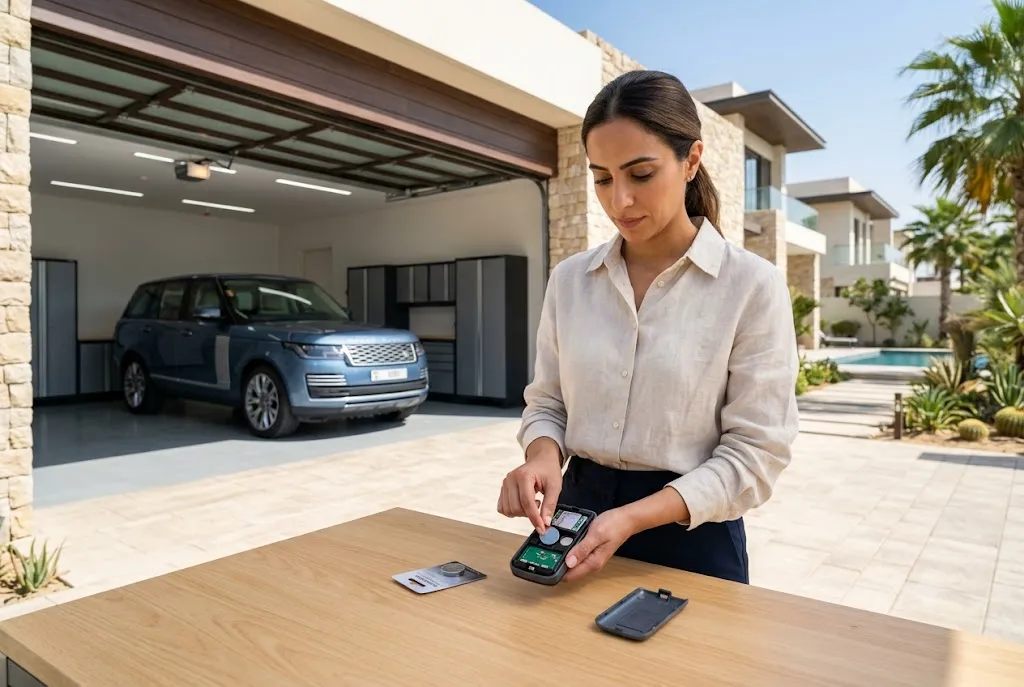
A timely garage door remote battery replacement is one of the simplest ways to keep your garage door operating smoothly. If your remote suddenly stops working, responds intermittently, or only works from a very short distance, a weak battery is often the first thing to check. Fortunately, replacing the battery usually takes only a few minutes and can restore your remote’s full performance without requiring professional repairs.
Understanding when to replace the battery, selecting the correct battery type, and following proper installation steps can help prevent unexpected access issues while extending the life of your garage door remote.
Why Garage Door Remote Batteries Matter
Your garage door remote relies entirely on battery power to transmit a wireless signal to the garage door opener. As the battery weakens, the signal becomes less reliable, causing delayed responses or complete failure.
Regular battery replacement ensures dependable operation, improves signal strength, and reduces the likelihood of being locked out due to a non-functioning remote.
Signs You Need a Garage Door Remote Battery Replacement
Several warning signs indicate it’s time to replace your remote battery.
- The remote only works at a very short distance.
- The garage door responds inconsistently.
- The remote LED becomes dim or fails to illuminate.
- The door requires multiple button presses.
- The remote stops working completely.
Many homeowners assume the remote has failed when, in reality, only the battery needs replacing.
Common Causes of a Garage Door Remote Dead Battery
A garage door remote dead battery can occur for several reasons.
Normal Battery Aging
Most remote batteries last between one and three years, depending on usage and battery quality.
Frequent Daily Use
Homes with multiple daily garage door cycles naturally consume battery power more quickly.
Extreme Temperatures
High temperatures, especially during UAE summers, may shorten battery lifespan.
Long-Term Storage
Unused remotes stored for long periods may experience battery discharge or leakage.
Choosing the Correct Garage Door Opener Remote Battery
Before replacing the battery, identify the exact battery model recommended by the remote manufacturer.
Common battery types include:
- CR2032
- CR2025
- CR2016
- A23 12V
- 9V batteries (for certain keypad systems)
Always verify the battery specification printed inside the battery compartment or in the owner’s manual.
How to Replace Your Remote Battery
Replacing the battery is usually straightforward.
- Open the remote using the release slot or small screwdriver if required.
- Remove the old battery carefully.
- Check the battery orientation (+ and -).
- Insert the new battery in the same position.
- Close the remote securely.
- Test the remote several times.
Using high-quality replacement batteries often provides better performance and longer service life.
What If the Remote Battery Is Not Working After Replacement?
If the remote battery not working issue continues after installing a new battery, consider the following possibilities.
Incorrect Battery Installation
Verify that the battery is installed with the correct polarity.
Wrong Battery Type
Using an incompatible battery may prevent the remote from operating correctly.
Dirty Battery Contacts
Inspect the battery terminals for dirt or corrosion and clean them carefully if necessary.
Remote Requires Reprogramming
Some remotes may lose programming after extended battery removal or system servicing.
Internal Hardware Failure
If a new battery does not restore operation, the remote’s circuit board or buttons may be damaged.
Weak Garage Remote Signal: Causes and Solutions
A weak garage remote signal is another common issue homeowners encounter.
Possible causes include:
- Weak battery.
- Nearby electronic interference.
- Damaged garage door opener antenna.
- Metal obstructions blocking the signal.
- Remote nearing the end of its service life.
Replacing the battery is the easiest and most cost-effective first troubleshooting step.
Battery Maintenance Tips
Proper maintenance helps maximize battery life.
- Replace batteries before they become fully depleted.
- Use quality branded batteries.
- Avoid mixing old and new batteries.
- Keep battery contacts clean.
- Store spare batteries in a cool, dry place.
- Remove batteries from unused remotes stored for long periods.
When Should You Replace the Entire Remote?
Battery replacement won’t solve every problem. Consider replacing the remote if:
- Buttons no longer respond.
- The casing is badly damaged.
- Signal problems continue after installing a fresh battery.
- The remote repeatedly loses programming.
- Your garage door opener has been upgraded.
If you’re looking for a new transmitter, our guide to garage gate remote control explains how to choose a compatible replacement.
Other Convenient Garage Access Options
In addition to handheld remotes, many homeowners install a wireless garage door keypad for secure PIN-based entry. Using both a keypad and a remote provides greater flexibility for family members and visitors.
When Professional Assistance Is Needed
If replacing the battery does not restore normal operation, the issue may involve the receiver, antenna, garage door opener, or electrical components. A qualified garage door technician can diagnose the problem and recommend the appropriate repair or replacement.
Final Thoughts
A regular garage door remote battery replacement is one of the easiest maintenance tasks homeowners can perform. Replacing weak batteries before they fail helps maintain reliable operation, improves signal strength, and prevents unnecessary inconvenience. By using the correct battery type and following proper maintenance practices, you can keep your garage door remote functioning efficiently throughout the year.
For additional guidance on garage door safety, maintenance, and automatic access systems, visit the Door & Access Systems Manufacturers Association (DASMA), a trusted industry resource.
